Aesthetic PC Build Trends RGB and White Builds
White cases amplify RGB lighting while matching modern home interiors.

White cases now make up roughly 35% of the market. That's not a niche look anymore, it's the direction the whole industry has moved, and RGB lighting is riding along with it, because the two feed each other in ways that are easy to explain but rarely get spelled out.
Why white builds and RGB have merged into one dominant aesthetic movement
The mechanics are simple. RGB lighting throws more color, more contrast, and more visible detail against a white surface than against black. Every strip, every fan hub, every glowing logo does more work on a white panel than it would in a dark case, so builders chasing a strong visual result gravitate toward white almost by default. White makes RGB look sharper, and RGB gives white builds a reason to exist beyond just looking clean. That loop is tight, and it's why the two trends now read as one.
A broader shift in home interiors feeds this too. Interiors have drifted toward lighter palettes and simpler shapes for years, away from the dark wood and black metal that dominated for a couple of decades. Desk setups sit inside living rooms and bedrooms now, in a way they didn't when a tower got shoved under a desk out of sight. A white case with clean panel lines fits a bright room in a way a matte black tower with mesh vents never quite could.
The "hardware disappearing" argument comes up a lot here, and it deserves pushback. Some outlets have floated the idea that the endgame of PC aesthetics is components nobody notices. That's a different goal from RGB maximalism entirely, and white cases don't belong to either camp. They aren't trying to vanish, and they aren't trying to flood a room with light. White gives a build a cleaner, quieter presence while still leaving room for color. Reading it as a stopover on the road to minimalism misses what builders are actually chasing.
What real builders are running, and why showcase builds don't represent the typical buyer
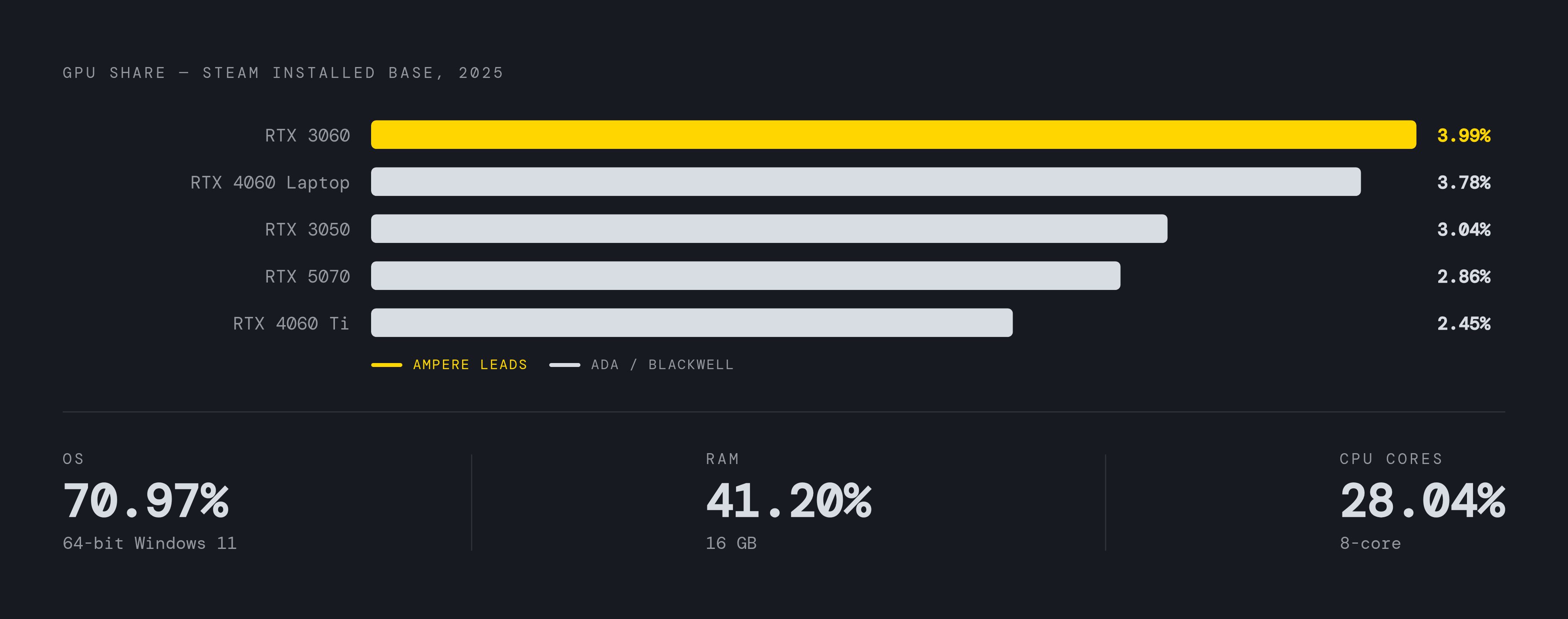
None of this happens on flagship hardware, and most coverage gets that wrong. The Steam Hardware Survey shows 70.97% of tracked machines on 64-bit Windows 11, 41.20% at 16GB of RAM, and 28.04% on an 8-core CPU. That's a mid-range machine, distinct from the five-figure tempered-glass rig built to be photographed for a gallery.
GPU data makes the point harder to miss. The same survey puts the RTX 3060 on top with 3.99% share, followed by the RTX 4060 Laptop GPU at 3.78%, the RTX 3050 at 3.04%, the RTX 4060 Ti at 2.45%, and the RTX 5070 at 2.86%. Nvidia's Ampere generation, which launched years before any of this white-and-RGB trend took hold, still forms the backbone of the installed base. The newest cards appear in the numbers, but nowhere near the top, and that gap alone should reset expectations for anyone reading a "best white build" list.
The shift in VRAM is visible in real time. 8GB configurations remain the single most common at around 27.5%, but 16GB is climbing fast, near 23.5%, as Nvidia's RTX 50-series ships 16GB as the standard baseline instead of an upsell.
Setting those numbers against the coverage white builds actually receive makes the mismatch obvious fast. Reviews, photo galleries, and "best of" roundups skew hard toward enthusiast and showcase-tier hardware. Anyone buying a white case in 2026 is far more likely running 1080p or 1440p on a GPU that's a generation or two old than running whatever card shows up in the glossy build photos, and any real purchase plan should start from that gap rather than from the gallery.
How white surfaces change the physics of RGB
White surfaces reflect RGB lighting about 40% more effectively than black ones do. That's basic optics, not a marketing claim: a lighter, more reflective surface bounces more of the light hitting it back into the room instead of absorbing it. In practice, a white build needs fewer RGB components to hit the same brightness a black build needs twice as many fans and strips to reach.
The tradeoff is that white punishes mismatches black never would. A slightly warm white panel or a fan with a different plastic tint disappears into shadow on a black case. On white, that same mismatch is the first thing anyone notices, and it's the detail that separates a build that photographs well from one that just looks unfinished.
Builders run into three shades in practice, and confusing them is the most common way a build goes wrong. Pure white is bright, reflects light well, and covers most current cases on the market. Off-white or cream runs warmer and turns up on older or budget-tier parts. Light gray gets marketed as "white" but reads noticeably duller in person than in a product photo. Mixing these three without checking real photos from actual builders, not manufacturer renders, is widely cited as the single most common cause of a mismatched build.
Brand consistency helps, to a point. Lian Li and ASUS ROG both lean on similar pure-white shades across their lineups, and Corsair's white runs slightly warmer but stays consistent within its own range. Pulling case, cooler, and GPU from three different brands without checking the actual shade each one ships in first raises this risk.
Color choice on the RGB itself behaves differently against white too, and this is where a lot of builds go wrong before they even start. Blues and purples read clean and saturated against a white panel. Reds and oranges wash out toward pink or salmon, which makes color selection a far bigger planning question on a white build than it ever was on black. Anyone set on warm tones should test them against the actual panel before buying, not after.
Why the software layer is now the hardest part of an RGB build
The move from standard RGB to addressable RGB is basically finished. As of the first quarter of 2026, more than 87% of new RGB-capable components ship as individually addressable only, meaning 5V, 4-pin lighting elements that can each run their own color, rather than the older 12V 4-pin standard that lit an entire strip as one uniform block. There's no real case left for buying into 12V RGB in 2026. It's a legacy format, kept alive mostly by older parts still sitting on shelves.
RGB has also stopped being purely decorative. Lighting doubles as system feedback in a lot of builds now: color shifts tied to CPU or GPU load, network activity, thermal thresholds, even microphone mute status. That's a real functional layer stacked on top of the aesthetic one, and it's raised what builders expect their lighting software to actually do.
Which is exactly where the friction lives, and most buying guides skip it. Corsair's iCUE and ASUS's Armoury Crate each do their job well inside their own ecosystem, but stack three or four of these on one machine and you get lock-in and conflict that turn a multi-brand RGB build into a genuine headache. Two lighting apps fighting over the same onboard controller happens often enough that it's pushed a lot of builders toward a different approach, and for good reason: the software, not the hardware, is what breaks first.
OpenRGB has become the default answer for most of them. It's free, cross-platform, supports more than 300 devices across Corsair, ASUS, MSI, Gigabyte, ASRock, and Lian Li, and it doesn't need a vendor account or a manufacturer's cloud service just to change a fan color. Anyone building across multiple brands, which describes most builders by necessity given how component pricing and availability actually work, should treat OpenRGB as the starting point for that reason.
Choosing a white case: what the finish, airflow, and durability tradeoffs look like across budgets
White cases yellow over time. That's chemistry, not a defect: UV exposure, heat cycling, and slow oxidation of the coating push a white finish toward dull cream or pale yellow the longer it sits under light and heat. Cheap powder coatings can show visible yellowing within 18 to 24 months. Sourcing at.org indicates higher-grade UV-stable coatings hold their finish for five years or more before the change becomes noticeable, and that gap, not any spec sheet feature, is the real reason to spend more on a case.
That durability gap tracks closely with brand tier. Lian Li, Corsair, and NZXT use UV-stable coatings across their 2026 white lineups, while budget makers like GAMDIAS and Vetroo tend to use standard coatings far more prone to yellowing under the same conditions. None of that appears on a spec sheet, and it rarely appears in a first-week review either. It only becomes visible months later, near a window or a warm exhaust vent, by which point the return window has closed.
There's a price tax on top of the durability gap. White cases typically run 10 to 20% more than the same case in black, largely because of lower production volume and the extra quality control needed to keep a light color from showing surface flaws that black would hide.
For builders working with a real budget instead of an unlimited one, the Corsair 3000D costs around $80 and covers most mainstream builds without asking for compromises. It ships with an open front panel for airflow, RGB fans included out of the box, and enough GPU clearance for most mid-range builds.
White GPUs: which cards exist, what they cost, and how to match them to a build
A white GPU runs the exact same silicon as its black counterpart, built on either Nvidia's Blackwell architecture or AMD's RDNA 4. Shroud color changes nothing about performance, full stop. The entire value proposition is the 40% reflectivity gain covered above: more visible light, more contrast against a light-colored case, at a cost premium of roughly 10 to 20% over the equivalent black card, according to.org. Anyone paying that premium expecting a faster card is paying for the wrong thing.
At the top end, the ASUS Prime GeForce RTX 5070 White OC Edition stands out as an Editor's Choice pick, with 12GB of GDDR7, an SFF-ready 2.5-slot design, and 0dB silent operation at idle. The black Prime RTX 5070 has been tested at 62°C under sustained full load, though that figure comes from testing on the black variant and hasn't been separately confirmed for the White OC Edition. It's a capable 1440p and 4K card with DLSS 4 support.
The GIGABYTE GeForce RTX 5070 AERO OC 12G takes the Best Value slot, running a triple-fan WINDFORCE cooler at 324mm in length, backed by a 4-year warranty and aimed at 1440p gaming. Its white shade may differ from other brands in the build, so check it against other components before committing to a color-matched build. On the budget end, the ASRock RX 9060 XT Steel Legend 8GB OC brings RDNA 4 and a triple-fan 0dB cooler to a strong 1080p and 1440p option for anyone building white on a tighter budget.
Beyond those three, a wider pool of confirmed white cards covers most price points. The XFX RX 9070 XT Swift White carries 16GB of GDDR6 with no 12VHPWR connector and a clean triple-fan look. The ASUS Prime RX 9070 XT White matches that 16GB GDDR6 capacity with a 3030MHz OC mode and 2.5-slot Axial-tech fans. The ASRock RX 9070 Steel Legend, also 16GB GDDR6 on RDNA 4, adds Polychrome SYNC RGB.
Further down the stack, the ASUS Dual RTX 5060 Ti 16GB White runs Blackwell in a 2.5-slot form factor with Dual BIOS support, while the GIGABYTE RX 9060 XT Gaming OC ICE offers 16GB of GDDR6 and WINDFORCE cooling, though it skips Dual BIOS. The XFX RX 9060 XT OC White pushes a 3320MHz boost clock on 16GB of GDDR6, and the PowerColor RX 9070 XT Hellhound White pairs 16GB GDDR6 with a metal backplate and a 2-year warranty.
Entry-level options round out the list. The ASUS Dual RTX 5060 8GB White brings Blackwell to a compact form factor at a lower price. The ASRock RX 9060 XT Steel Legend also comes in an 8GB configuration with Polychrome RGB. The GUNNIR Intel Arc A770 Photon 16GB offers 16GB of memory at a budget-friendly price, an unusual entry from Intel's Arc lineup in this space. The ASRock RX 7600 Challenger 8GB runs RDNA 3, and the maxsun RX 580 8GB White serves as a real budget option for 1080p builds that don't need modern architecture.
White RAM, coolers, and motherboards, the detail components that make or break finish consistency
RAM used to be an afterthought in build aesthetics, tucked under a GPU shroud where nobody noticed the color. Cases now ship with windowed side panels as the default rather than the exception, so RAM sits in plain sight, and the color choice that used to not matter now decides whether a build looks finished or thrown together. White DDR5 kits with RGB lighting have gone from a specialist niche to a widely stocked, mainstream category by 2026.
The Corsair Vengeance RGB DDR5 running at 6000MHz with CL36 timings takes the Editor's Choice slot: individually addressable RGB zones, Intel XMP 3.0 support, and a 4.8-star average across more than 3,700 reviews. It needs Corsair's iCUE software for full lighting control, and by default the RGB can stay lit even when the system is powered off, though that setting can be switched off inside iCUE.
A CL30 variant of the same Vengeance RGB line trades some latency headroom for tighter timings and supports both AMD EXPO and Intel XMP profiles. The G.Skill Trident Z5 RGB, running at 6000MT/s in a matte white finish, offers the same dual-profile flexibility across AMD and Intel platforms. For builders on a tighter budget, TeamGroup's T-Force Delta RGB at 6000MHz takes the Best Value spot, with a 120-degree ultra-wide RGB diffuser, CL30 timings, AMD EXPO readiness, and a lifetime warranty behind it.
None of these kits change memory performance in any measurable way over their black equivalents, the same rule that governs white GPUs applies here too. What changes is whether the RAM matches the rest of the build under a windowed panel. With pure-white kits from multiple major manufacturers stocked at retail now, there's no excuse left for settling on a mismatched beige module sitting next to a bright white motherboard.